
Academic discovery moves faster with the right tools at your fingertips. AI tools now enhance every stage of research, streamlining tasks that once required hours of manual work. Chat-based engines generate topic ideas in minutes; literature finders can surface relevant studies in one search; and smart analyzers reveal patterns that once took weeks to uncover. The result is more time for critical thinking, fewer hours lost to manual tasks and a clearer path from hypothesis to publication.
This guide breaks down the research workflow stage by stage and spotlights the best AI tools for research at every point. Real-world examples and pricing snapshots demonstrate how to align each tool with your research goals, alongside clear guidance on citation, verification and policy compliance. By the end, you’ll know which platforms deliver the greatest benefits and how to integrate them into your research process.
Where AI Fits in the Academic Research Workflow
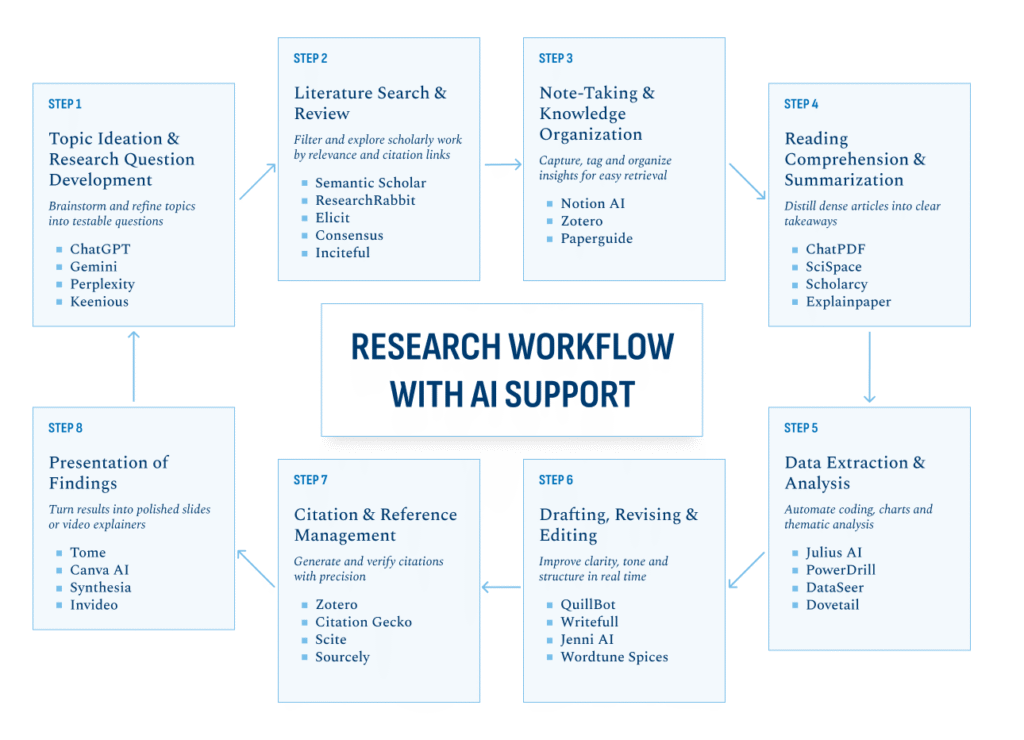
Even a well-planned study can stall when repetitive tasks drain time and focus. Mapping the research journey clarifies where smart tools can reduce the load. Here’s how AI tools enhance every phase:
Step 1. Topic Ideation & Research Question Development
AI-driven brainstorming systems analyze existing literature trends and skim broad databases to propose fresh angles, suggest related disciplines and sharpen loose ideas into focused, testable research questions.
Step 2. Literature Search & Review
AI-driven databases can filter thousands of papers by relevance, citation pattern and research quality. They surface related work in minutes instead of days spent sifting through generic keyword results.
Step 3. Note-Taking & Knowledge Organization
Platforms such as Notion AI, Zotero and Paperguide tag articles automatically, cluster insights by theme and sync highlights across devices. Organized notes speed up cross-referencing when you move into analysis and writing.
Step 4. Reading Comprehension & Summarization
AI summarizers extract essential findings, define specialized terms in context and produce concise outlines to help you grasp a paper’s core arguments before you commit to a full read.
Step 5. Data Extraction & Analysis (Quantitative or Qualitative)
From cleaning raw datasets to running statistical tests or coding qualitative interviews, AI-powered analytics automate repetitive tasks and surface trends you might overlook, leaving you free to interpret results.
Step 6. Drafting, Revising & Editing
Writing assistants suggest clearer phrasing, flag inconsistencies, enforce style guidelines and check grammar in real time, so you can refine your argument without waiting on peer review.
Step 7. Citation & Reference Management
Intelligent reference managers identify sources, format citations in any style, detect duplicates and verify metadata, cutting the time you spend on bibliography maintenance and error checking.
Step 8. Presentation of Findings
AI design tools recommend layouts, generate visuals or slide decks from text prompts and even produce short video summaries, helping you package results in formats that engage diverse audiences.
RELATED: Your Future in Artificial Intelligence: Where To Start >>
Top 25 AI Tools for Academic Research
Covering concept development through final presentation, these 25 AI platforms can help you work smarter, not harder, throughout your research workflow.
Topic Ideation & Research Question Development
Early idea work shapes everything that follows. These tools jumpstart brainstorming, refine focus and turn broad interests into testable questions.
| Platform | Purpose | Primary Capabilities | Pricing | Best For |
| ChatGPT | Generate topic ideas and refine research questions | Brainstorm in natural language and explore follow-up angles | Free tier; $20/month for Plus; $200/month for Pro; higher tiers for teams and enterprise customers | Rapid concept exploration and interactive querying |
| Gemini | Surface interdisciplinary connections for novel research angles | Contextual proposal of related fields and question prompts | Free with Google account; paid plans start at $19.99/month | Uncovering niche intersections across domains |
| Perplexity AI | Answer natural-language queries with evidence-based citations | Instant Q&A, citation links, source ranking | Free use; Pro plan at $20/month for higher query limits; Enterprise Pro is $40/month per seat | Quick fact-checking and gap identification |
| Keenious | Recommend under-explored topics and relevant literature | Semantic matching of themes and citation suggestions | Free basic; Individual tier starts at $10/month; Teams plan starts at $20/year; institutional licenses available | Finding less obvious research angles in large corpora |
Literature Search & Review
Filtering vast collections of studies can overwhelm even seasoned researchers. These tools narrow results by relevance, citation patterns and methodological fit, shrinking days of manual searching into minutes of targeted review.
| Platform | Purpose | Primary Capabilities | Pricing | Best For |
| Semantic Scholar | Discover papers using AI-driven relevance scoring | Citation graphs, influential paper highlights, author profiles | Free | Mapping key works and influential authors |
| ResearchRabbit | Build visual “literature maps” for citation chaining | Network graphs, alert feeds for new publications | Free basic; Pro at $12/month | Exploring how studies connect through citations |
| Elicit | Automate literature review with question-based search | Summarize methods, results and sample sizes | Free tier; Plus plan at $10/month; Pro plan at $42/month; Team plan at $65/month; Custom prices for enterprise | Rapid extraction of study details for systematic reviews |
| Consensus | Aggregate answers from peer-reviewed research | Topic-focused summaries with linked sources | Free tier; Premium plan at $8.99/month; Teams tier at $9.99/month; Enterprise tier at custom price/month | Obtaining succinct insights backed by academic sources |
| Litmaps | Visualize citation networks and discover related papers | Interactive literature maps, forward /backward citation tracking, email alerts for new links | Free basic plan; Pro plan $10/month; Team plans available | Quickly spotting influential works and research clusters |
Note-Taking & Knowledge Organization
Well-structured notes prevent insights from slipping through the cracks. These services tag, categorize and synchronize content for seamless retrieval.
| Platform | Purpose | Primary Capabilities | Pricing | Best For |
| Notion AI | Enhance personal databases with smart tagging and summaries | Auto-generate page summaries, suggest related content | Free personal plan that includes AI trial; Plus plan at $10/month per member with AI trial; AI add-on included in Business tier at $20/month per user and enterprise tier | Centralizing notes, tasks and resource links in one workspace |
| Zotero | Collect and organize research sources and annotations | Browser capture, tag hierarchies, PDF annotation | Free; storage upgrades from $20/year | Managing bibliographies alongside detailed notes |
| Paperguide | Auto-summarize articles and highlight key passages | Section-by-section summaries, exportable notes | Free tier; Plus plan at $12/month; Pro at $24/month | Quickly extracting highlights from long PDFs |
Reading Comprehension & Summarization
Complex texts can slow progress. The following AI assistants transform dense content into clear, bite-sized takeaways.
| Platform | Purpose | Primary Capabilities | Pricing | Best For |
| ChatPDF | Chat with any PDF to get instant answers | Section queries, keyword search, conversational follow-ups | Free basic; Plus at $13.99/month | Interactive exploration of lengthy papers |
| SciSpace | Highlight critical ideas and define terms in context | Inline definitions, visual summaries, PDF import | Free; Premium tier at $12/month; Advanced tier at $70/month; Teams tier at $8/month per user; Enterprise tier available | Breaking down jargon and methods quickly |
| Scholarcy | Generate structured summaries and flashcards | Key-point extraction, comparison tables, reference export | Free article summarizer; Paid tier is $9.99/month | Creating study guides from multiple articles |
Data Analysis (Quantitative & Qualitative)
Moving from raw data to insights demands both precision and speed. These platforms automate extraction, visualization and pattern discovery to turn complex datasets into clear, actionable findings.
| Platform | Purpose | Primary Capabilities | Pricing | Best For |
JuliusAI | Analyze interview transcripts for thematic trends | Automatic coding, sentiment scoring, exportable reports | Free basic; Plus tier at $20/month; Pro plan at $45/month; Enterprise tier available | Qualitative research with large text datasets |
DataSeer | Audit data tables for reproducibility and compliance | Data lineage tracking, anomaly detection | Custom enterprise plans | Ensuring data integrity in quantitative studies |
| Dovetail | Synthesize user research with shared workspaces | Tag clustering, journey mapping, collaborative notes | Free starter; Professional plan at $29/user/month; Enterprise plans available | Organizing qualitative insights in design-oriented research |
Drafting, Revising & Editing
Clear writing can be as demanding as analysis. AI editors refine prose, enforce consistency and polish tone without draining time. These editors maintain momentum by delivering instant feedback and draft support.
| Platform | Purpose | Primary Capabilities | Pricing | Best For |
QuillBot | Paraphrase and rephrase text for clarity | Multiple rewriting modes, grammar checks | Free limited use; Premium at $19.95/month | Reworking sentences to improve flow |
Writefull | Validate academic style against published corpora | Language suggestions, statistical feedback, phrase banks | Free basic; Premium at $150/year; Group plan (two seats) at $285/year; Institution tier available | Ensuring discipline-appropriate terminology |
| Jenni AI | Generate draft paragraphs from simple prompts | Outline building, citation placeholders, tone adjustment | Free basic; Unlimited tier at $12/month; Custom team and institutional plans available | Overcoming writer’s block with structured first drafts |
Citation & Reference Management
Accurate citations underpin scholarly trust. The following tools automate reference formatting and verify source details.
| Platform | Purpose | Primary Capabilities | Pricing | Best For |
| Citation Gecko | Build citation networks from seed papers | Interactive graph view, export to Zotero/EndNote | Free | Discovering relevant works through citation paths |
| Scite | Check how papers support or contradict each other | Smart citations tagged as supporting, contradictory or mentioning | Free trial; Personal plan at $12/month; Custom organizational pricing available | Assessing the citation context before inclusion |
Presenting Findings
A clear presentation helps audiences follow your discoveries. These platforms turn written work into engaging visuals or videos.
| Platform | Purpose | Primary Capabilities | Pricing | Best For |
| Canva AI | Generate graphics and layouts with AI-assisted design tools | Template suggestions, brand asset integration | Free tier; Canva Pro at $120/year; Canva Teams at $100/year per person; Canva Enterprise plans available | Designing infographics and figures with minimal effort |
| Synthesia | Produce AI-driven video explainers with virtual presenters | Script-to-video, avatar selection, multilingual voice-overs | Free basic; Starter plan at $18/month; Creator tier at $64/month; Enterprise plans available | Creating short video summaries of research findings |
Best Practices for Ethical and Effective AI Use in Research
Using AI tools brings major gains but also new responsibilities. The following guidelines help you preserve accuracy, respect privacy rights and meet academic standards.
First, always review your institution’s policy on ethical AI use. Then apply these practices throughout every project:
- Verify AI Outputs
Always cross-check facts, figures and citations against original sources. Treat AI suggestions as starting points rather than final answers. - Disclose AI Involvement
Note where and how you used AI, whether for idea generation, data analysis or drafting, in your acknowledgments or methodology section. - Avoid Plagiarism
Paraphrase AI-generated text and cite underlying sources. Even when AI rephrases existing work, ensure you provide proper attribution. - Respect Copyrights
Check the license of any AI-generated or third-party content you plan to include. Do not upload unpublished or confidential manuscripts to public tools without permission. - Watch for Bias
AI models reflect their training data. Review outputs for skewed language or unfair assumptions and correct or supplement them with diverse sources. - Protect Sensitive Data
Do not share participant information or proprietary data with external AI services unless they guarantee compliance with research ethics and data-protection standards.
How USD’s MS-AAI Program Embraces AI Tools in Practice
USD’s Master of Science in Applied Artificial Intelligence (MS-AAI) is a five-semester program available in both online and on-campus formats, designed to blend theory and hands-on practice. Across ten courses and a capstone, students work directly with professional AI platforms, from semantic search engines and data-cleaning suites to model-auditing tools and visualization software. Guided discussions ensure they understand each tool’s limits, bias risks and citation requirements.
Early modules pair question-refinement exercises with AI-driven literature searches and instant checks on source accuracy. Mid-program labs move into data analytics, where students clean real datasets, run statistical tests and audit model outputs for fairness. Alongside technical work, AI ethics reviews cover transparency, data privacy and proper attribution.
In the capstone, small teams define a research problem, select a tailored AI toolkit, execute a full study cycle and present results to faculty and industry mentors.
|
Student Spotlight:
Ashley Moore (MS-AAI ’25)
recently demonstrated her coursework at the 2025 Society of Quality Assurance Annual Conference.
In a workshop titled “GPT on the Line,” she guided auditors through live ChatGPT prompts that generated
compliance checklists and training plans on the spot. She then led a session on ethical AI in pharma
and biotech, sparking discussion on governance and transparency.
“Learning how language models process tokens rocketed my understanding of intelligent systems and helped me explain AI to non-technical teams,” she notes, illustrating how the program combines practical tool use with rigorous ethical reflection. |
This integrated approach equips MS-AAI graduates to lead AI-driven research with confidence and uphold rigorous standards.
RELATED: Harnessing the Power of Generative AI Tools at USD’s MS in AAI Program >>
Final Thoughts: Using AI for Research
AI tools can transform how you conduct academic research, from brainstorming and literature review to analysis and presentation. By following best practices, you can leverage these platforms without compromising integrity. USD’s MS-AAI program combines this guidance with real-world projects so you can build both technical know-how and responsible habits.
Ready to explore further? Download USD’s free eBook, Artificial Intelligence: 8 Questions to Ask Before Selecting an Applied Artificial Intelligence Master’s Program, and start equipping your research with the right questions — and the right tools.
Considering a Master’s in Artificial Intelligence?
Free checklist to help you compare programs and select one that’s ideal for you.
Frequently Asked Questions
How can AI be used as a research tool?
AI can assist at every stage: idea generation, literature discovery, text summarization, data analysis, drafting and presentation design. By automating repetitive work and highlighting key insights, it lets you spend more time on interpretation and critical thinking.
What are the best AI tools for research?
No single platform does it all. For ideation, tools like ChatGPT or Gemini help brainstorm; for literature review, Semantic Scholar or Elicit speed discovery; for note organization, Notion AI or Zotero; for summarization, SciSpace or ChatPDF; for data analysis, Julius AI or DataSeer; and for presentation, Tome or Canva AI.
What is the primary advantage of using AI tools for research writing?
AI writing assistants deliver instant feedback on clarity, grammar and structure, so you can refine your prose more quickly and focus on strengthening your argument.
What is one of the key ethical practices when using AI in research?
Always verify AI-generated information against original sources and cite any material that informed your work. Transparency about AI’s role safeguards integrity and meets academic standards.
Why is AI good for research?
AI accelerates time-consuming tasks, uncovers patterns in large datasets and manages information overload, freeing you to apply your expertise where it matters most.
How to use AI as a study tool?
Leverage AI summarizers to convert articles into concise notes, chatbots for on-demand Q&A and flashcard generators to reinforce concepts. Incorporate these into your routine to study more efficiently and test your understanding.