For instructional designers, a portfolio is often the first thing employers look at and one of the most challenging aspects to get right. Deciding what to include, how much detail to provide and how to present your work can feel overwhelming, especially when roles and expectations vary widely across the field.
A well-constructed instructional design portfolio does more than display finished projects. It demonstrates how you think, how you approach problems and how your skills apply to practical learning challenges.
What Is the Purpose of an Instructional Design Portfolio?
An instructional design portfolio is a curated collection of your work, typically presented on a website and designed to showcase the projects you have completed. It serves several important purposes, including:
- Demonstrating your skills: It proves your ability to create learning experiences, from concept to execution.
- Reflecting your creativity: The portfolio showcases your innovative solutions and creative approach to instructional challenges.
- Displaying your experience: It highlights your involvement in various projects, verifying your versatility in the field.
- Attracting employers/clients: A strong portfolio can catch the attention of potential employers or clients.
- Showcasing new capabilities: Regular updates to your portfolio can help highlight areas of professional growth and development.
[RELATED] The Top 4 Instructional Design Skills You Need to Land Your Dream Career (and How to Master Them)
How to Build an Instructional Design Portfolio
Creating an instructional design portfolio is not just about showcasing your technical skills; it’s also about presenting your work in an accessible, engaging and professional manner. Let’s explore the two key aspects of this process.
Curating Your Body of Work
This is a critical step that involves selecting projects that best showcase your skills and style. Here are five considerations for assembling your content:
- Tailor your selection to the job description: Choose projects that mirror the skills listed in your target roles and emphasize the capabilities most relevant to each position.
- Showcase a wide variety: Project diversity can help demonstrate your range of skills across different instructional design contexts, from analysis and design to development and evaluation. A varied portfolio appeals to a broader audience and demonstrates your adaptability.
- Limit your showcase to six to ten standout pieces: Less is sometimes more and helps keep the focus on relevant work.
- Feature process artifacts: Add ADDIE/SAM design documents, needs assessments or prototype storyboards to show how you approach instructional problems.
- Include eLearning course samples: Showcase one or two courses built in tools such as Articulate Storyline or Rise, and briefly note what each example demonstrates, such as interactivity, accessibility considerations or content simplification.
- Include collaborations: Projects completed with others can highlight communication, project management and stakeholder collaboration skills, all of which are essential in instructional design roles.
- Consider demo projects: To fill gaps or showcase specific capabilities, consider adding demo projects. These can be conceptual or volunteer/pro bono projects that emphasize your strengths. Check out Kristin Anthony’s Go Design Something or E-Learning Heroes’ Challenges for inspiration.
- Narrate your work’s story: Each project should include a brief explanation of the problem, your role, the skills and tools used and the outcomes. Be clear about what a prospective employer should learn from the example and how it reflects your approach to instructional design.
Technical Construction of Your Portfolio Website
The technical construction of your portfolio website is equally important. Here are four things to prioritize:
- Choose the right platform: Pick a platform that suits your technical skills and is user-friendly, such as WordPress, Wix or Squarespace.
- Focus on design and navigation: Aim for a clean, intuitive design. Easy navigation is key to showcasing your work effectively.
- Ensure mobile-first responsiveness: A responsive design will automatically adjust your layout, text size and images to fit any screen size, which not only improves the user experience but also helps to meet web accessibility requirements
- Maintain a professional look: A sleek and professional website design reflects positively on your professionalism and should enhance, not overshadow, your work.
- Protect confidential work: Create a password-protected section and supply the password to interested recruiters so they can privately review proprietary projects.
5 Tips for a Compelling Instructional Design Portfolio
A strong instructional design portfolio is more than just a collection of work; it’s a carefully crafted representation of your professional identity. Here are five essential tips to make your portfolio stand out:
- Aim for clarity: Common mistakes include overloading your portfolio with too much content, neglecting to provide context for your projects or using a confusing layout. Aim for clarity, conciseness and relevance in your presentation.
- Display contact information: Ensure your contact information is easy to find and up to date. Place it prominently on your website, either in the header or footer or on a dedicated contact page, making it easy for potential employers or clients to reach you.
- Use consistent branding: Consistent branding helps in creating a memorable and professional image. This includes using a cohesive color scheme, typography and a consistent tone in your descriptions. It also demonstrates to potential employers that you know how to adhere to corporate brand standards.
- Keep it current: Regularly update your portfolio to reflect your latest work and learnings. This not only shows your most current skills but also demonstrates your commitment to professional growth and adaptability in the field.
- Design with accessibility in mind: Ensure your portfolio is accessible and inclusive by following Web Content Accessibility Guidelines (WCAG) and Universal Design for Learning (UDL) best practices. This includes using clear headings, sufficient color contrast, readable fonts, alternative text for images and captions or transcripts for multimedia. Need help evaluating webpage accessibility? WebAIM Wave is the go-to free resource for doing just that.
By following these tips, your instructional design portfolio will showcase your best work and present it in a way that is professional, accessible and reflective of your ongoing development in the field.
[Related] Learn how to write an effective cover letter when applying for an Instructional Designer position.
Instructional Design Portfolios Examples
Exploring outstanding instructional design portfolios can provide valuable insights into crafting your own. The following examples come from independent instructional designers and learning experience designers, selected to illustrate different approaches to presenting work effectively:
Cath Ellis
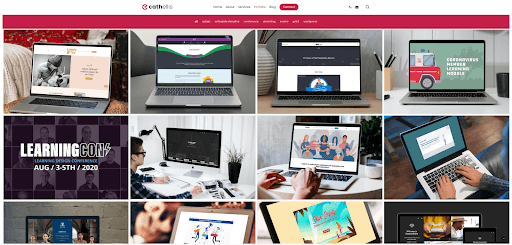
Cath Ellis showcases a portfolio that is visually striking and user-friendly. Her work spans eLearning development and instructional design consulting, with an intuitive layout that makes it easy to explore projects and understand her creative approach at a glance.
Nyla Spooner
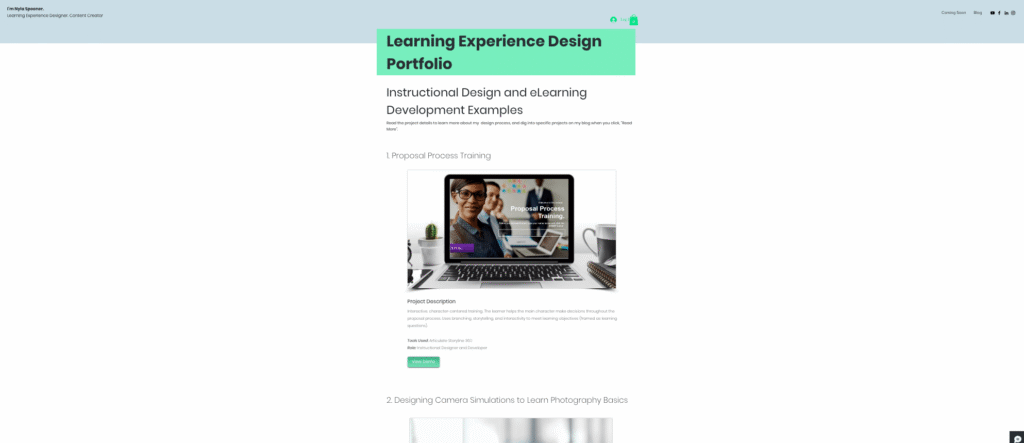
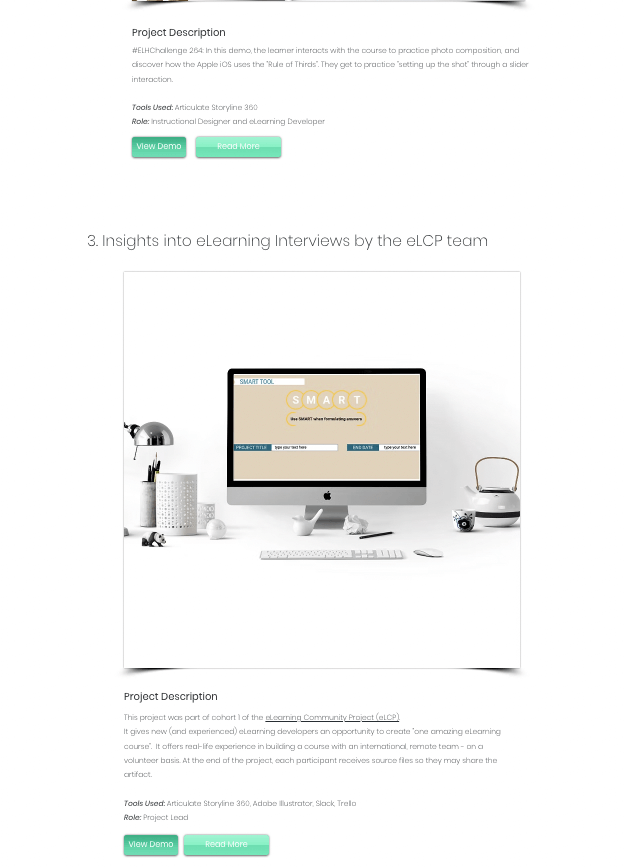
Nyla Spooner presents a portfolio with a clean structure and clearly defined projects. Each example includes a concise overview of the learning goal, tools used and her role in the work. Several projects include demos and opportunities to explore additional details, helping viewers understand how she approaches design decisions and development.
Anita Kumar
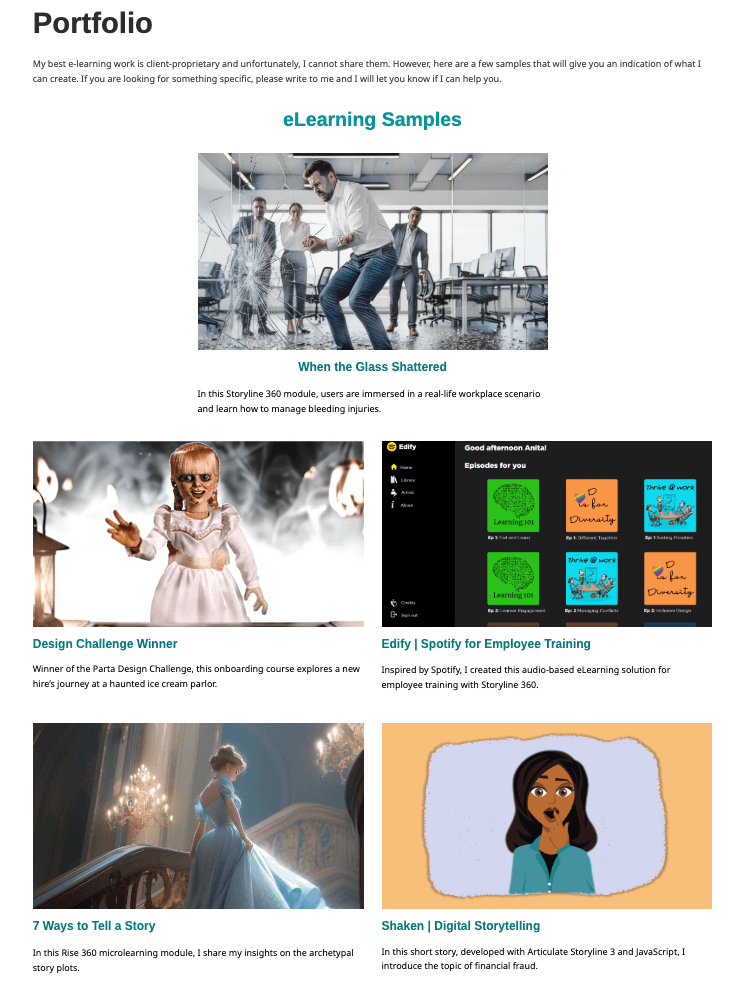
Anita Kumar shares a well-organized portfolio featuring eLearning samples that illustrate different instructional approaches, from scenario-based learning to microlearning experiences. The format variety highlights how she adapts learning design to different goals, audiences and use cases.
Rounding Out Your Instructional Design Skills
A strong instructional design portfolio shows what you can do today, but it can also highlight areas for growth. Reviewing your work can help identify gaps in skills such as learning strategy, assessment design, technical development and collaboration.
To build your instructional design skills, consider targeted education, pro bono projects or stretch assignments that let you practice new approaches. These experiences can strengthen your portfolio over time and demonstrate a commitment to continuous learning.